In my previous Terraform post, I built a disposable Ubuntu EC2 instance with Docker installed. I could run terraform apply, get a clean Docker host, use it and destroy it when I was done.
That solved the problem I had at the time.
But what happens if I lose the state file? What happens if somebody deletes the instance directly in AWS? Does Terraform immediately create another one like Kubernetes would? What happens when a resource has to be replaced, and how do I stop a bad Terraform change from quietly reaching main?
So I went back to the same project and made it behave more like something I would actually want to maintain.
By the end, I had added:
- remote state in S3
- state locking
- a separate bootstrap configuration
- a deliberate drift test
- a lifecycle rule for replacement order
- a feature branch and pull request workflow
- GitHub Actions checks for formatting and validation
Where the first project stopped
The original project already did what I needed: It found an Ubuntu 22.04 AMI, used the default VPC, created a security group, launched EC2 and installed Docker through user_data.
The project now looks like this:
ubuntu-ec2-docker/
├── .github/
│   └── workflows/
│       └── terraform-ci.yml
├── bootstrap/
│   ├── main.tf
│   ├── outputs.tf
│   └── variables.tf
├── infrastructure/
│   ├── backend.tf
│   ├── main.tf
│   ├── outputs.tf
│   ├── terraform.tfvars.example
│   ├── user_data.sh
│   ├── variables.tf
│   └── versions.tf
└── README.md
I separated it this way because the two parts do not have the same lifespan.
bootstrap/ creates the S3 bucket that holds my Terraform state, and I want that to stay.
infrastructure/ creates the EC2 instance and security group. I want to be able to destroy those whenever I am done testing.
.github/workflows/ contains the checks that run when I open or update a pull request.
Terraform State
Terraform state keeps track of infrastructure.
Terraform code  -> What I want
AWS             -> What actually exists
Terraform state -> How Terraform connects the two
If my configuration contains:
resource "aws_instance" "ubuntu" {
  # configuration
}
and AWS creates an instance such as:
i-0123456789abcdef
the state is what lets Terraform remember that the real EC2 instance belongs to aws_instance.ubuntu in my code.
My first version stored that information in a local terraform.tfstate file. That works for a lab, but now the state is tied to one directory on one computer. I also cannot solve that by committing the file to Git because state can contain sensitive information and is not meant to be edited and merged like normal source code.
I wanted the infrastructure state somewhere separate from my laptop, so I decided to put it in S3.
The S3 chicken-and-egg problem
This introduced a slightly funny problem.
I wanted Terraform to use an S3 bucket, but the bucket did not exist yet. Terraform cannot store its state in a bucket that still needs to be created.
I could have clicked around the AWS console and created it manually, but that would mean the first piece of my Terraform setup was not actually managed with Terraform.
So I created a separate configuration under bootstrap/.
Its job is simple: create the long-lived bucket that the main infrastructure will use for state.
The important parts look like this:
resource "aws_s3_bucket" "terraform_state" {
  bucket = var.state_bucket_name

  lifecycle {
    prevent_destroy = true
  }
}

resource "aws_s3_bucket_versioning" "terraform_state" {
  bucket = aws_s3_bucket.terraform_state.id

  versioning_configuration {
    status = "Enabled"
  }
}

resource "aws_s3_bucket_server_side_encryption_configuration" "terraform_state" {
  bucket = aws_s3_bucket.terraform_state.id

  rule {
    apply_server_side_encryption_by_default {
      sse_algorithm = "AES256"
    }
  }
}

resource "aws_s3_bucket_public_access_block" "terraform_state" {
  bucket = aws_s3_bucket.terraform_state.id

  block_public_acls       = true
  block_public_policy     = true
  ignore_public_acls      = true
  restrict_public_buckets = true
}
Versioning gives me older versions of the state object if something overwrites it. Encryption protects it at rest. Public access is blocked because there is no reason for a Terraform state file to be public.
I also added:
lifecycle {
  prevent_destroy = true
}
That makes Terraform reject a plan that would destroy the bucket. It is not magical protection from anybody with enough AWS access, but it gives me a useful guardrail against accidentally running the wrong Terraform operation.
I applied bootstrap/ once and left it alone. Destroying my temporary EC2 environment should not also destroy the place where Terraform remembers it.
I created the bucket, but Terraform still was not using it
This was the part that caught me.
I had successfully created the S3 bucket, so I thought I had remote state.
Creating a bucket only gives Terraform somewhere to store state. It does not tell the configuration inside infrastructure/ to actually use it.
When I checked the project later, there was no S3 backend block. Terraform was still using local state.
I added infrastructure/backend.tf:
terraform {
  backend "s3" {
    bucket       = "dami-terraform-state-2026"
    key          = "docker-host/terraform.tfstate"
    region       = "us-east-1"
    encrypt      = true
    use_lockfile = true
  }
}
bootstrap/main.tf         -> Creates the S3 bucket
infrastructure/backend.tf -> Tells Terraform to use the bucket
The key is the location of the state object inside the bucket.
use_lockfile = true enables state locking. If two Terraform operations try to update the same state at once, the lock prevents both of them from writing over each other.
After adding the backend, I initialized the infrastructure again:
cd infrastructure
terraform init -migrate-state
I expected Terraform to ask me whether I wanted to copy my state into S3, but it did not.
At first, that made me think something was wrong, but I had already destroyed the earlier infrastructure, so there was effectively no active resource state worth migrating.
The better test was to apply the infrastructure again and check S3 directly:
aws s3 ls s3://dami-terraform-state-2026 --recursive
This time I saw:
docker-host/terraform.tfstate
Now I had proof that Terraform was actually writing the infrastructure state into it.
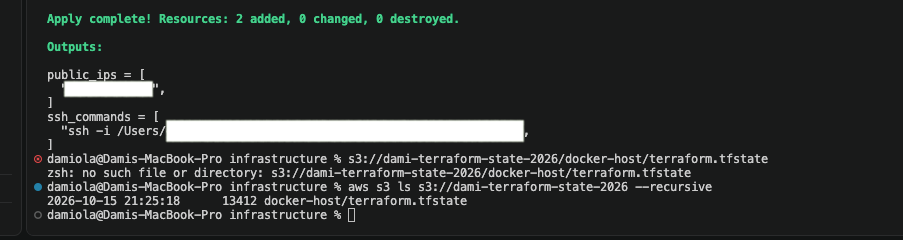 After applying the infrastructure, I verified that Terraform had written the state file to the S3 backend under
 docker-host/terraform.tfstate.
Then I deleted the EC2 instance behind Terraform’s back
I wanted to see what Terraform would do if AWS no longer matched my configuration, so I went into the AWS console and terminated the instance manually. At that point, the three views looked like this:
Terraform code  -> The instance should exist
Terraform state -> Terraform previously managed the instance
AWS             -> The instance is gone
That disagreement is drift.
When I ran terraform plan, Terraform refreshed its view of AWS, noticed the missing instance and proposed creating another one. I ran terraform apply, and the instance came back.
This answered a question I used to have about Terraform and Kubernetes.
If I tell Kubernetes that I want two replicas and delete one, Kubernetes normally notices and creates another one because its controllers are continuously reconciling the cluster.
Terraform does not sit in the background watching my AWS account.
It checks the configuration, state and real infrastructure when I run something like:
terraform plan
terraform apply
or when automation runs those commands for me.
So yes, Terraform can detect the missing instance and recreate it, but no, it will not do that immediately just because the instance disappeared. Terraform has to run first.
Controlling replacement order with a lifecycle rule
Some infrastructure changes can be made to an existing resource, while others require Terraform to replace it completely.
For example, changing certain EC2 attributes may cause Terraform to destroy the existing instance and create another one. By default, this can mean the old instance is removed before its replacement is available.
To change that order, I added a lifecycle block to the EC2 resource:
resource "aws_instance" "ubuntu" {
  count = var.instance_count

  ami                         = data.aws_ami.ubuntu_2204.id
  instance_type               = var.instance_type
  vpc_security_group_ids      = [aws_security_group.ubuntu_sg.id]
  key_name                    = var.key_name
  associate_public_ip_address = true

  user_data                   = file("${path.module}/user_data.sh")
  user_data_replace_on_change = true

  lifecycle {
    create_before_destroy = true
  }

  tags = {
    Name = "${var.name_prefix}-${count.index + 1}"
  }
}
A lifecycle block changes how Terraform manages a specific resource. In this case, create_before_destroy tells Terraform to attempt the replacement in this order:
Create the new EC2 instance
Then destroy the old EC2 instance
This can reduce disruption during a planned replacement because Terraform tries to make the new resource available before removing the existing one. However, it does not automatically make the server highly available, and it should not be treated as a complete zero downtime strategy.
AWS must also allow both resources to exist at the same time. Dependencies such as fixed names, IP addresses or capacity limits can still affect the replacement.
This is also different from the drift test. During the drift test, I manually deleted the EC2 instance, so there was no old instance left for Terraform to preserve. Terraform simply detected that the resource was missing and created another one during the next apply.
The lifecycle rule only affects replacement order when the existing resource is still present.
I added CI, but I did not let it deploy anything
I did not want to jump straight into letting GitHub deploy to AWS. I wanted a smaller first version that could answer:
Is this Terraform formatted correctly, and is the configuration valid?
I created:
.github/workflows/terraform-ci.yml
GitHub looks for workflows under .github/workflows/ at the root of the repository. Putting it inside a different directory would not make it a GitHub Actions workflow.
The workflow runs on pull requests targeting main:
name: Terraform CI

on:
  pull_request:
    branches:
      - main
    paths:
      - "infrastructure/**"
      - ".github/workflows/terraform-ci.yml"

permissions:
  contents: read

jobs:
  terraform-checks:
    name: Format and validate
    runs-on: ubuntu-latest

    defaults:
      run:
        working-directory: infrastructure

    steps:
      - name: Check out repository
        uses: actions/checkout@v6

      - name: Install Terraform
        uses: hashicorp/setup-terraform@v4

      - name: Check Terraform formatting
        run: terraform fmt -check -recursive

      - name: Initialize Terraform without backend
        run: terraform init -backend=false -input=false

      - name: Validate Terraform configuration
        run: terraform validate -no-color
The commands are doing three different jobs:
terraform fmt -check -> Is the formatting correct?
terraform init       -> Install what validation needs
terraform validate   -> Is the configuration internally valid?
The important part of the initialization command is:
terraform init -backend=false
That tells Terraform not to connect to my real S3 backend during this check.
This workflow does not run terraform plan or terraform apply against AWS, so it does not need AWS credentials. It checks the code. It does not deploy the code.
A green check was not enough, so I broke it on purpose
I wanted to know whether the workflow would actually stop a bad change.
I intentionally misformatted main.tf, committed it and pushed the branch.
GitHub Actions failed at the formatting step, named the file and returned exit code 3.
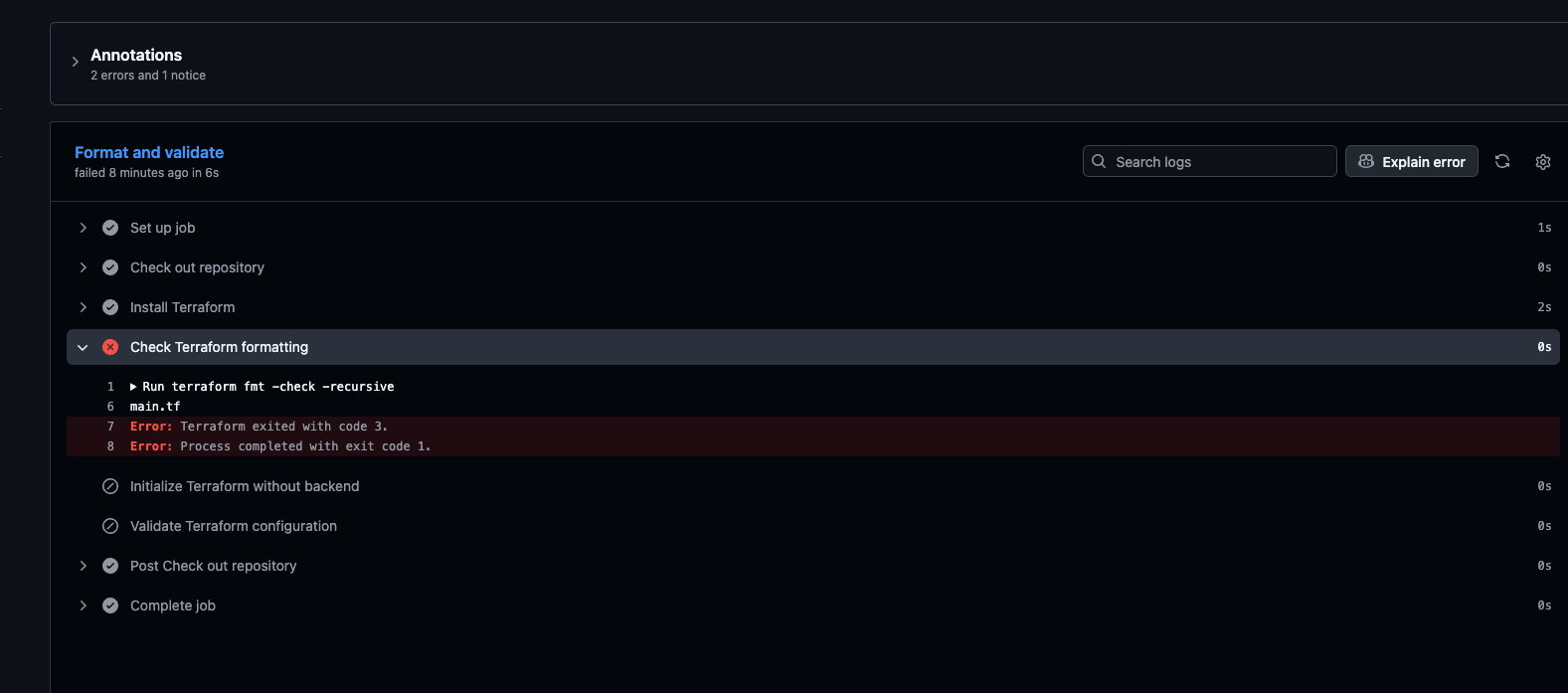 The CI workflow stopped at
 terraform fmt -check -recursive after detecting that main.tf was not formatted correctly.
Then I ran:
terraform fmt
git add infrastructure/main.tf
git commit -m "Fix Terraform formatting"
git push
The check ran again and passed.
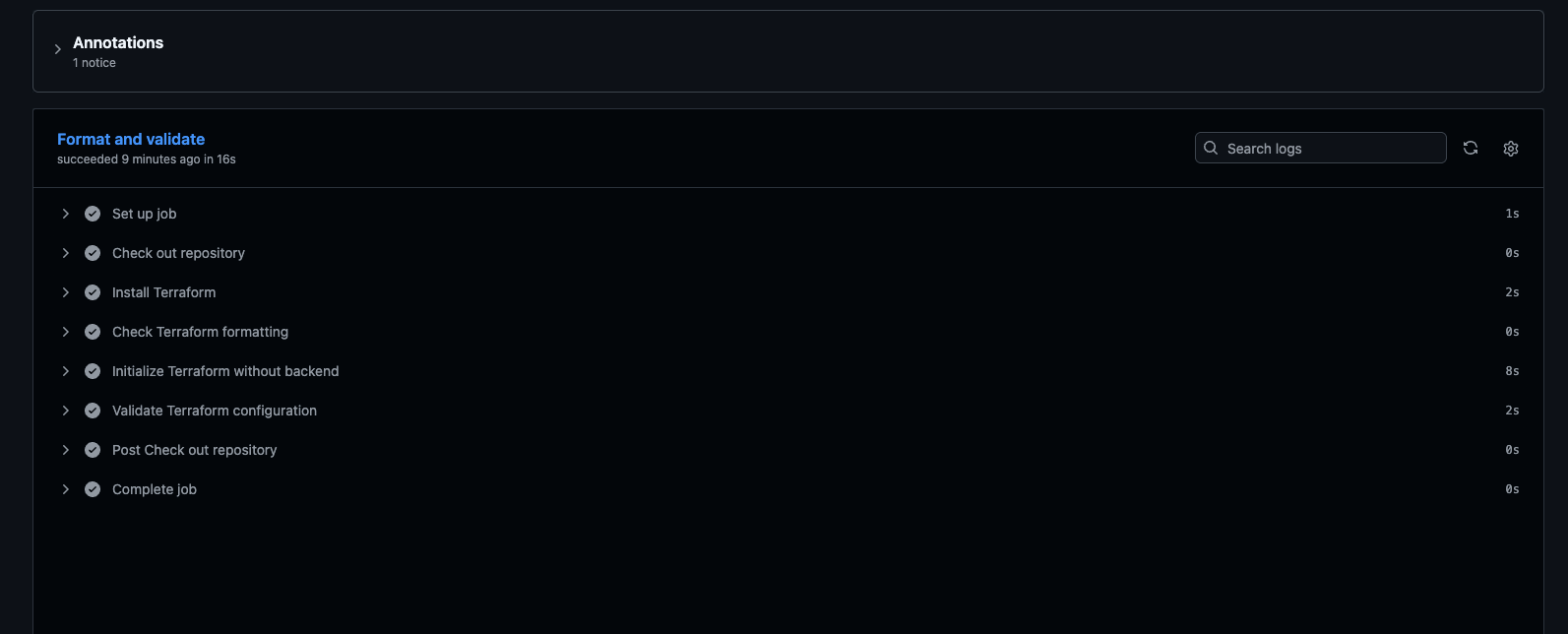 After running
 terraform fmt and pushing the correction, the workflow completed successfully: formatting, initialization and validation all passed.
The Git workflow also became part of the project
I made the changes on a feature branch:
git switch -c feature/terraform-ci-remote-state
At one point, I could see the branch locally but not on GitHub. The reason was simple: creating a local branch does not automatically create the remote branch.
I pushed it and set the upstream relationship:
git push -u origin feature/terraform-ci-remote-state
After that, a normal git push knew where to send my changes.
The final flow became:
Make changes on a feature branch
Push the branch
Open a pull request
Let GitHub Actions run
Fix anything that fails
Merge into main
Tearing down the compute without losing the project
Once I finished testing, I did not need to leave the EC2 instance running.
From infrastructure/, I ran:
terraform destroy
Terraform removed the EC2 instance and security group, then updated the remote state in S3 to reflect that those resources no longer existed.
The S3 bucket was not destroyed because it is managed separately by the configuration in bootstrap/. Running terraform destroy from infrastructure/ only affects resources managed by that Terraform configuration and state file.
Git repository -> Stores the Terraform configuration and project history
S3 backend     -> Stores Terraform's infrastructure state
EC2 instance   -> Disposable compute that costs money while it runs
This allowed me to stop paying for unused compute while keeping everything required to recreate the environment with another terraform apply.
Beyond the first Terraform apply
The first version of this project focused on describing and creating infrastructure. Extending it meant dealing with what happens after that first successful apply: where state lives, how Terraform responds to drift, how replacements are handled and how changes are checked before being merged.
These were the main operational takeaways:
Configuration describes the desired infrastructure.
AWS contains the actual infrastructure.
Terraform state connects the two.

Creating an S3 bucket is not the same as configuring an S3 backend.

Terraform can detect and correct drift, but it is not a continuous
reconciliation system. Terraform must be run.

create_before_destroy changes replacement order when the original
resource still exists. It does not recover a resource that is already gone.

CI validation checks the configuration. It does not deploy infrastructure.

Disposable infrastructure does not mean disposable configuration or state.
Writing the EC2 resource was still part of the project, but it was no longer the most important part.
Remote state, drift handling, lifecycle behavior and CI validation turned the configuration from a collection of .tf files into a more complete infrastructure workflow.
What I would add next
The current GitHub Actions workflow checks formatting and validates the Terraform configuration, but it deliberately does not access AWS or deploy anything.
The next iteration would add AWS authentication through GitHub Actions using OpenID Connect (OIDC). This would allow GitHub Actions to assume an AWS IAM role and receive short-lived credentials instead of storing permanent AWS access keys as repository secrets.
From there, the pipeline could be extended to run Terraform plans automatically and, eventually, apply approved infrastructure changes. But that is a separate step.